

Managing a server inventory often starts with collecting endless records and manual tracking that eats up hours every week. But most IT teams do not realize how easy it is to miss massive gaps just using spreadsheets. Automated inventory tools can catch 100 percent of your hardware changes in real time and even uncover hidden servers in isolated network zones. So the biggest surprise is that the most critical improvements in accuracy come not from overhauling your hardware but simply by rethinking your approach to tracking.
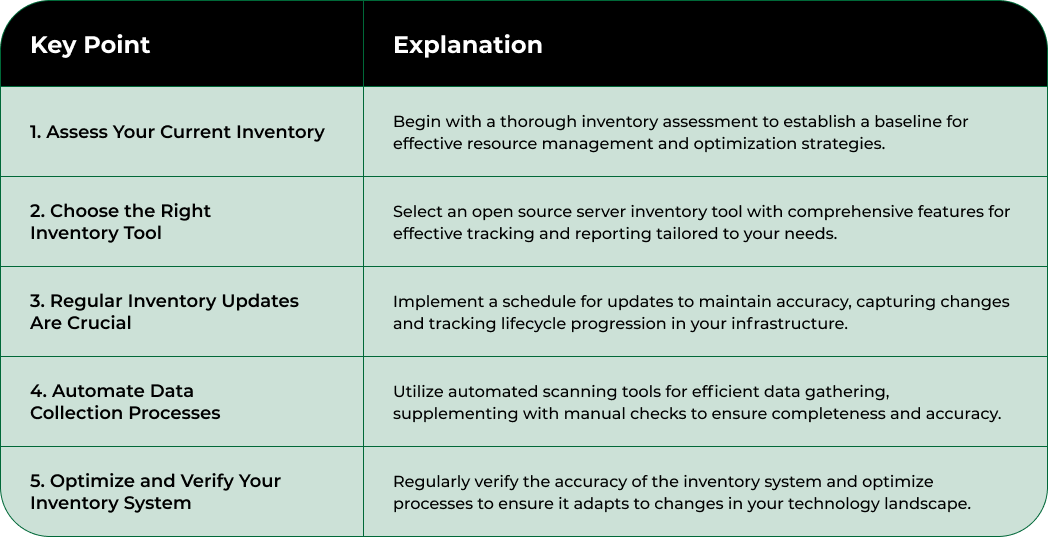
Assessing your current server inventory infrastructure represents the critical foundation for effective open source management. This initial step provides a comprehensive snapshot of your existing hardware, software, and configuration landscape, enabling strategic planning and optimization.
Begin by conducting a thorough network scan using robust open source inventory tools like OCS Inventory, which can automatically discover and document your entire server ecosystem. During this process, capture granular details including hardware specifications, software versions, network configurations, and current asset locations. Pay special attention to collecting metadata about each server’s processor type, memory capacity, storage configuration, and installed operating systems.
Create a centralized digital repository that maps your entire server inventory. This repository should not just be a static spreadsheet but a dynamic database that can track real-time changes and provide actionable insights. Integrate automated discovery mechanisms that can continuously update your inventory, reducing manual tracking efforts and minimizing the risk of outdated information.
Key attributes to document in your initial assessment include:
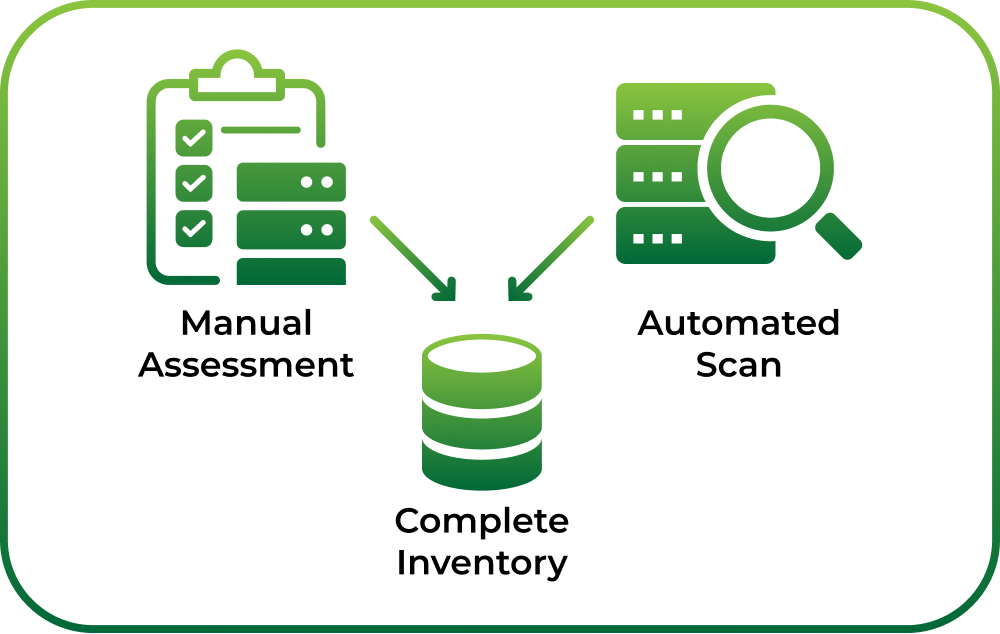
Validate your inventory assessment by cross-referencing automated scan results with physical server records and conducting spot-check audits. This verification process ensures data accuracy and helps identify any discrepancies between recorded and actual server configurations.
By meticulously documenting your current infrastructure, you establish a solid baseline for future server inventory management strategies. This comprehensive assessment will inform subsequent optimization efforts and enable more intelligent resource allocation across your organization’s computing environment.
Selecting the right open source server inventory tool represents a pivotal decision that will significantly impact your infrastructure management capabilities. This critical step transforms your initial assessment into a dynamic, actionable system that provides real-time insights and tracking for your server ecosystem.
Start by evaluating open source tools that offer comprehensive scanning, reporting, and management features. Look for solutions that provide automated discovery, detailed asset tracking, and seamless integration with your existing network infrastructure. Tools like OCS Inventory stand out as robust options, offering extensive network scanning capabilities and detailed hardware and software documentation.
Consider the specific requirements of your organization when selecting an inventory management tool. Different environments demand different features some organizations might require extensive reporting capabilities, while others need advanced remote management functionalities. Prioritize tools that offer flexibility, scalability, and ease of customization to match your unique infrastructure needs.
Below is a comparison table of key features to evaluate when selecting an open source server inventory tool, helping you make an informed decision based on your organizational needs.
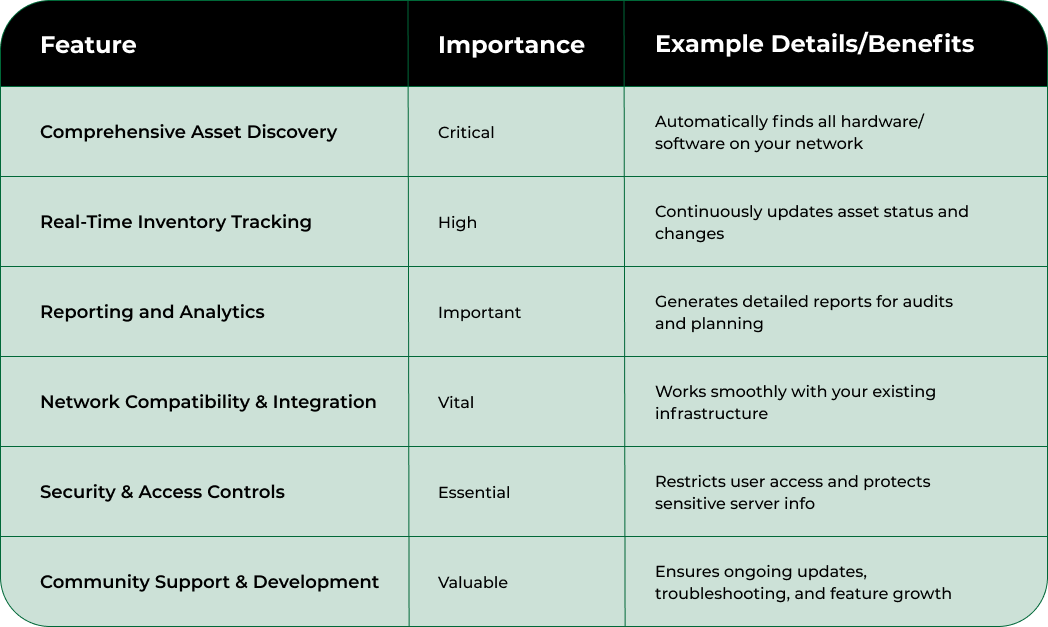
Key evaluation criteria for selecting an open source server inventory tool include:
Implement a pilot testing phase where you deploy the selected tool in a controlled environment. This approach allows you to validate the tool’s performance, assess its compatibility with your existing systems, and identify potential configuration challenges before full-scale implementation. During this phase, engage with your technical team to gather feedback and ensure the tool meets your specific operational requirements.
Verify the tool’s effectiveness by comparing its inventory results against your initial manual assessment. A successful implementation will provide more detailed, accurate, and dynamically updated information about your server infrastructure, enabling more strategic resource management and planning.
Installing and configuring your chosen open source server inventory tool marks a transformative moment in your infrastructure management journey. This step translates your strategic planning into a functional system that will provide ongoing insights and control over your server ecosystem.
Preparation is key before beginning the installation process. Ensure your target server meets all prerequisite system requirements, including appropriate operating system versions, necessary dependencies, and sufficient computational resources. Most open source inventory tools like OCS Inventory require specific environmental configurations, so carefully review the documentation and compatibility guidelines.
Begin the installation by creating a dedicated service account with appropriate permissions. This account should have sufficient network access to perform comprehensive scans while maintaining strict security protocols. Configure network firewall rules to allow the inventory tool’s communication channels, ensuring it can effectively discover and document server assets without creating unnecessary security vulnerabilities.
Configuration steps require meticulous attention to detail. Set up network scanning parameters that align with your infrastructure’s specific topology. Define which network segments and server types should be included in the inventory, establishing granular control over the discovery process. Pay special attention to configuring authentication mechanisms and access controls to protect sensitive server information.
Key configuration considerations include:
After initial configuration, conduct a comprehensive test scan to validate the tool’s functionality. Verify that the inventory tool successfully discovers and documents all intended server assets, cross-referencing the results with your initial manual assessment. Look for comprehensive details such as hardware specifications, software versions, network configurations, and current operational status.
A successful installation and configuration will provide a dynamic, real-time view of your server infrastructure, transforming raw data into actionable intelligence for more effective resource management and strategic planning.
Populating your server inventory represents a critical phase that transforms your infrastructure management from theoretical planning to practical implementation. This step involves systematically collecting and inputting comprehensive data about each server within your organization’s ecosystem.
Begin with a holistic approach to data collection, leveraging both automated scanning tools and manual verification processes. Your open source inventory management tool will perform initial automated discovery, but human oversight ensures accuracy and captures nuanced details that automated systems might miss. Coordinate with network administrators, system engineers, and IT support teams to gather supplementary information about each server’s operational context, historical modifications, and specific usage patterns.
Initiate the data population process by running comprehensive network scans using your selected inventory tool. These scans will automatically capture critical technical specifications including processor details, memory configurations, storage capacities, installed software versions, and network interface information. Supplement these automated findings with manual documentation of servers that might exist in isolated or restricted network segments.
Key data collection considerations include:
Verify the collected data through cross-referencing multiple sources. Compare the automated inventory results against physical server logs, purchase records, and existing documentation. This validation process helps identify potential discrepancies and ensures the accuracy of your server inventory database.
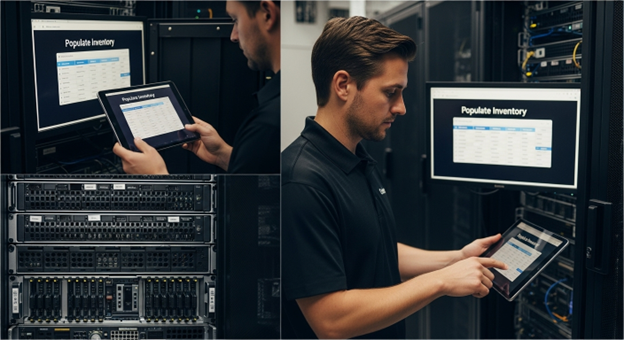
As you populate the inventory, implement a standardized data entry protocol that maintains consistency across different server types and organizational units. Develop clear guidelines for documenting server information, creating a uniform approach that allows for easy comparison and analysis. By meticulously populating your server inventory, you establish a robust foundation for future infrastructure management and strategic planning.
Implementing regular inventory management practices transforms your server inventory from a static database into a dynamic, living system that provides continuous insights and operational intelligence. This critical step ensures your infrastructure remains accurately documented and strategically managed over time.
Establish a consistent schedule for inventory updates and verification, designing a systematic approach that balances automated scanning with periodic manual reviews. Create a comprehensive calendar that outlines routine inventory checks, integrating both automated tool scans and human-driven verification processes. These scheduled assessments will help identify changes, track hardware lifecycle progression, and maintain the accuracy of your server infrastructure documentation.
Develop a robust change management protocol that captures and documents every significant modification to your server ecosystem. This includes tracking hardware replacements, software upgrades, network reconfigurations, and decommissioning events. Implement a standardized documentation workflow that requires immediate updating of the inventory system whenever a substantial change occurs.
Key practices for maintaining an accurate inventory include:
Integrate your inventory management practices with broader IT governance frameworks. This means connecting your server inventory system with incident management, procurement processes, and compliance tracking mechanisms. By creating these interconnected systems, you transform inventory management from a standalone task into a strategic organizational capability.
Verify the effectiveness of your inventory management practices through periodic audits. Compare automated scan results against physical server environments, review update logs, and assess the completeness and accuracy of your documentation. A successful implementation will provide real-time visibility into your server infrastructure, enabling more informed decision-making and proactive resource management.
Verifying and optimizing your server inventory system represents the culmination of your strategic management efforts, transforming raw data into a precision instrument for infrastructure intelligence. This critical step ensures the reliability, accuracy, and ongoing effectiveness of your inventory management approach.
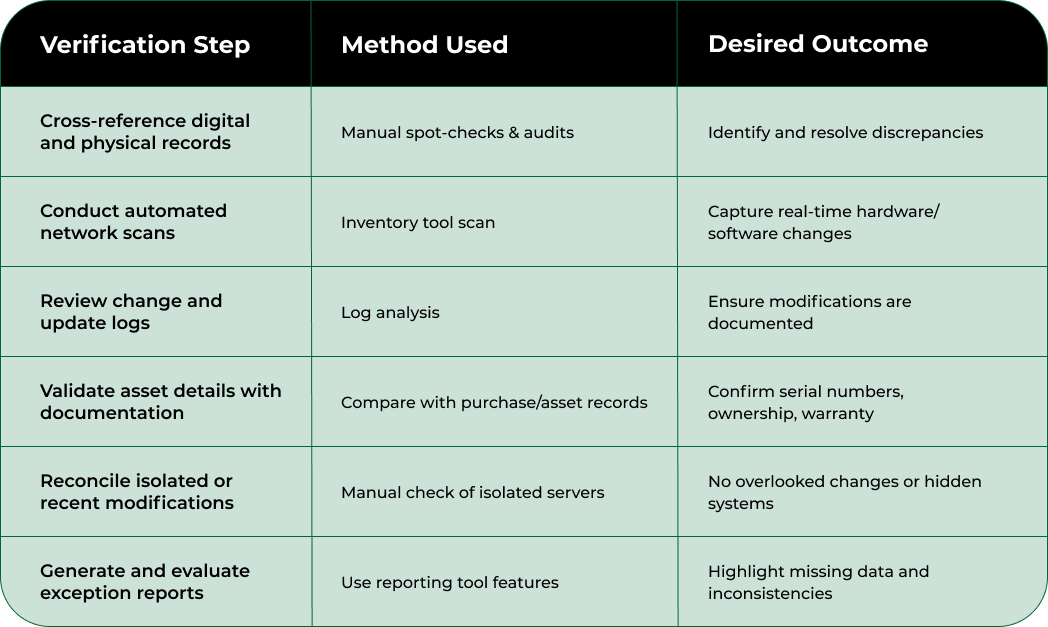
Initiate a comprehensive verification process that combines automated scanning with rigorous manual cross-referencing. Conduct side-by-side comparisons between your digital inventory records and physical server environments, meticulously identifying and resolving any discrepancies. This validation goes beyond simple data matching, requiring a deep understanding of your organization’s technological ecosystem and the nuanced changes that occur over time.
Develop a multi-layered verification strategy that includes automated system checks, manual audits, and periodic reconciliation processes. Leverage your open source inventory tool’s built-in reporting capabilities to generate comprehensive exception reports, highlighting potential inconsistencies or undocumented changes. Pay special attention to servers that might exist in isolated network segments or have undergone recent modifications.
Key optimization considerations include:
Optimize your inventory system’s performance by fine-tuning scanning parameters, reducing unnecessary resource consumption, and streamlining data collection processes. This might involve adjusting network scanning ranges, implementing more efficient data collection algorithms, and reducing redundant information gathering.
A successful verification and optimization process will result in a dynamic, self-correcting inventory system that provides real-time insights into your server infrastructure.
Use this server inventory verification checklist to ensure your records remain accurate and complete during routine management and optimization processes.
You already know the challenge of maintaining a precise and agile server inventory. The article emphasized how real-time tracking, accurate documentation, and automated management are vital steps in keeping your infrastructure efficient. If you are struggling with outdated records, slow manual updates, or hardware assets that underperform in your HPC or AI workflows, you are not alone. Many IT leaders face uncertainty when scaling or liquidating GPU servers and complex AI-ready systems.
Why wait for hidden gaps in your inventory to cause project delays or security risks? With Nodestream by Blockware Solutions, you get transparent access to an enterprise-grade platform designed for real-time inventory management and immediate hardware transactions. Explore bulk ordering, verified listings, and get customized support for high-volume server procurement or resale. Visit Nodestream’s homepage now and take the next confident step to streamline and optimize your infrastructure strategy today.
Begin by conducting a thorough network scan using open source inventory tools like OCS Inventory to document hardware specifications, software versions, and current asset locations.
Look for features such as automated discovery, real-time inventory tracking, robust reporting, network compatibility, and community support when selecting an open source server inventory tool.
Use a combination of automated discovery and manual verification for data collection. Ensure to document hardware specifications, software versions, and network configurations while cross-referencing multiple sources for accuracy.
Implement continuous verification processes by combining automated scans with manual audits, establish performance benchmarks, and ensure integration with broader IT governance frameworks to enhance your inventory system’s reliability and efficiency.

AI computing is quietly redrawing the boundaries of crypto, finance, and high-performance computing. Brace yourself. By…

Artificial intelligence is turbocharging the world of finance as never before, shaking up how both…

Digital transformation is about to completely reshape how we use crypto and artificial intelligence in…


