

Managing hundreds of servers seems overwhelming until you realize the chaos hidden in most IT setups. Over 40 percent of organizations operate with incomplete or outdated server inventories, risking downtime and ballooning costs. Everyone talks about new technology, but old habits like skipping proper server tracking cause the biggest headaches. The real surprise is that a few simple inventory steps can flip your whole strategy and save your business from costly surprises.
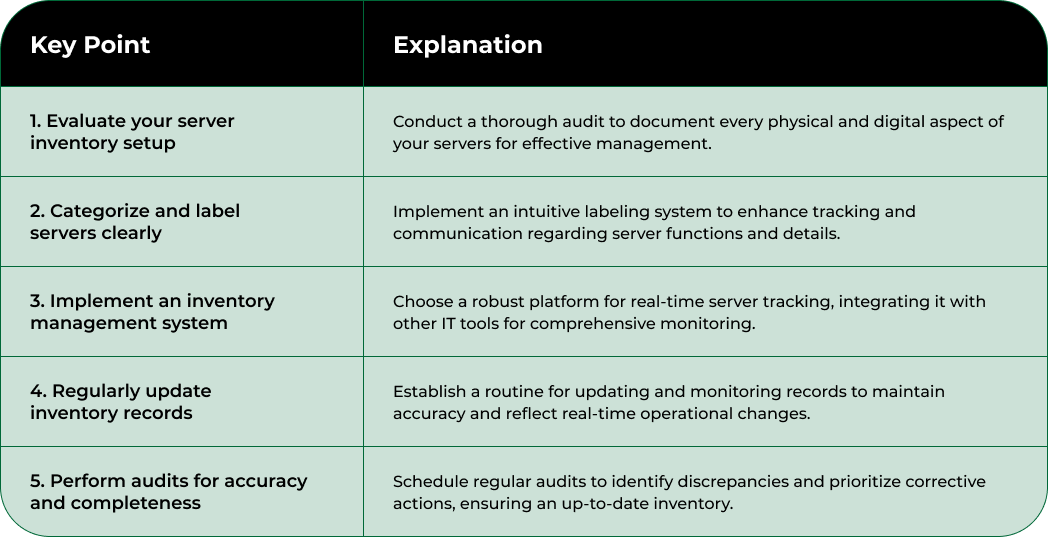
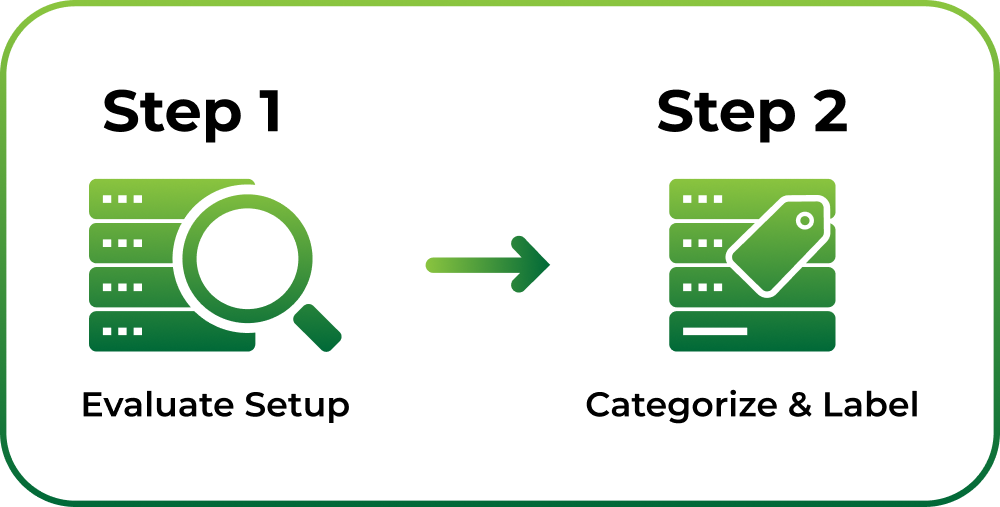
Evaluating your current server inventory setup is the critical first phase in transforming your infrastructure management strategy. This foundational step determines how effectively you can track, monitor, and optimize your server resources. Without a comprehensive initial assessment, you risk operating with incomplete or outdated information, which can lead to inefficient resource allocation, unexpected downtime, and increased operational costs.
Begin by conducting a thorough physical and digital inventory audit. Walk through your server rooms or data center, documenting every physical server, including its make, model, serial number, and current configuration. Use a standardized tracking spreadsheet or specialized inventory management software to record these details systematically. According to the University of California, Santa Barbara’s IT guidelines, your inventory should capture critical information such as administration contacts, server purpose, operational dependencies, installed software, network configuration, and security settings.
Parallel to the physical inventory, perform a comprehensive digital scan of your server infrastructure. Utilize network discovery tools and server management platforms that can automatically detect and catalog your entire server ecosystem. These tools will help you identify servers that might have been overlooked during manual inspection, including virtual machines, cloud instances, and legacy systems. Pay special attention to identifying servers with outdated hardware, unsupported operating systems, or configurations that deviate from your organization’s standard baseline.
As you compile your inventory, categorize servers based on several key parameters: function (web, database, application), location (on premises, cloud, hybrid), age, performance metrics, and current utilization rates. This categorization will provide immediate insights into potential optimization opportunities.
Look for servers with low utilization rates, those running deprecated software, or hardware nearing end of life. Create a preliminary action plan addressing potential consolidation, upgrade, or decommissioning opportunities based on your findings.
Finally, validate your inventory data by cross referencing physical assets with digital records. Ensure that every server in your physical environment is accurately represented in your digital tracking system. This verification process helps eliminate discrepancies and establishes a reliable baseline for future server inventory management efforts.
The following table provides an overview of each step in the server inventory management process, summarizing its main objective and expected outcome for quick reference.

Categorizing and labeling your server systems transforms a basic inventory into a strategic management tool. This critical step provides clarity, improves tracking, and enables more efficient resource allocation across your infrastructure. An intelligent categorization system allows you to quickly understand your server ecosystem’s composition, performance, and potential optimization opportunities.
According to the University of California, Santa Barbara’s server management guidelines, comprehensive server documentation is essential for effective management. Begin by developing a standardized labeling system that captures key information at a glance. Create a structured naming convention that includes critical details such as function, location, department, and deployment date. For example, a label like “WEB-PROD-MARKETING-2023Q2” immediately communicates the server’s purpose (web), environment (production), associated department (marketing), and deployment timeframe.
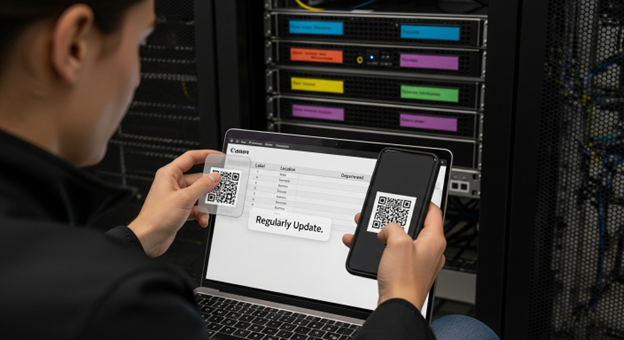
Implement a color-coded physical labeling system to complement your digital tracking. Use durable, high-contrast labels with machine-readable QR codes or barcodes that link directly to detailed server specifications. Place these labels in consistent, easily visible locations on each server, ensuring they remain legible even in dimly lit data center environments. Consider including essential information like asset tag number, serial number, primary contact, and critical network details.
Digitally categorize servers across multiple dimensions to provide granular insights into your infrastructure. Create primary categories based on functional roles such as web servers, database servers, application servers, and storage systems. Within these primary categories, develop subcategories that reflect more nuanced characteristics like processing power, memory configuration, network requirements, and compliance standards. This multilayered categorization enables more sophisticated resource planning and helps identify potential consolidation or upgrade opportunities.
Establish a centralized digital repository that maintains comprehensive server information. This repository should include not just basic specifications, but also detailed operational metadata such as current utilization rates, patch levels, software versions, network configurations, and maintenance history. By creating a single source of truth, you eliminate information silos and provide stakeholders with instant access to critical server intelligence. Implement regular review cycles to ensure this repository remains current, reflecting ongoing changes in your server infrastructure.
Implementing a robust inventory management system transforms your server tracking from a manual, error-prone process into a streamlined, intelligent operation. This critical step bridges the gap between raw data collection and strategic infrastructure management, providing real-time insights and control over your server ecosystem.
According to the University of Connecticut’s IT Security initiative, establishing a comprehensive inventory system is fundamental to effective IT asset management. Begin by selecting an inventory management platform that offers comprehensive tracking capabilities. Look for solutions that provide automated discovery, real-time monitoring, and integration with existing network management tools. Consider cloud-based platforms that offer scalability, remote access, and advanced reporting features. These systems should support automatic asset detection, allowing you to capture server details without manual intervention.
Configuration is key to creating a powerful inventory management system. Customize your chosen platform to align with the categorization framework developed in previous steps. Set up custom fields that capture your organization’s specific server attributes, such as department ownership, compliance requirements, and operational dependencies. Implement role-based access controls to ensure that only authorized personnel can view or modify server information, maintaining security and data integrity. Create automated alerts for critical events like approaching end-of-life dates, performance threshold breaches, or unexpected configuration changes.
Integrate your inventory management system with additional IT infrastructure tools to create a comprehensive monitoring ecosystem. Connect the platform with network monitoring solutions, security scanning tools, and configuration management databases. This integration enables a holistic view of your server infrastructure, providing deeper insights into performance, security, and potential optimization opportunities. Establish automated synchronization processes that continuously update the inventory with the latest server information, eliminating manual data entry and reducing the risk of outdated or inaccurate records.
Develop a structured process for ongoing maintenance and validation of your inventory management system. Schedule regular audits to verify the accuracy of recorded information, comparing digital records against physical assets. Create a change management protocol that requires immediate inventory updates whenever servers are added, modified, or decommissioned. Train your IT team on the new system, emphasizing the importance of consistent documentation and real-time reporting to maintain the integrity of your server inventory infrastructure.
Regularly updating and monitoring inventory records is the critical heartbeat of effective server inventory management. This ongoing process transforms your static inventory into a dynamic, living system that provides real-time insights into your infrastructure’s health and performance. Without consistent maintenance, your carefully constructed inventory quickly becomes obsolete, rendering previous documentation efforts meaningless.
According to Virginia Tech’s IT Security Office, maintaining an accurate server inventory is essential for rapid incident response and comprehensive asset management. Establish a structured update schedule that balances thoroughness with operational efficiency. Implement quarterly comprehensive reviews where your team conducts a full audit of server inventory records, cross-referencing physical assets with digital documentation. During these reviews, verify each server’s current configuration, software versions, network connections, and operational status.
Develop an automated monitoring system that captures real-time changes in your server infrastructure. Configure your inventory management platform to generate automatic alerts for critical events such as hardware modifications, software updates, performance anomalies, or potential security vulnerabilities. Create a standardized workflow that mandates immediate inventory updates whenever servers are added, modified, removed, or experience significant configuration changes. This approach ensures that your inventory remains current and reflects the actual state of your infrastructure at any given moment.
Integrate multiple verification mechanisms to maintain inventory accuracy. Implement periodic automated network scans that automatically detect and flag any discrepancies between your recorded inventory and actual server configurations. Establish a cross-functional validation process that involves IT operations, security teams, and departmental stakeholders in reviewing and confirming inventory records. Develop a clear escalation protocol for addressing and resolving any discovered inconsistencies, ensuring that potential issues are quickly identified and rectified.
Create a comprehensive documentation culture within your organization that emphasizes the importance of continuous inventory maintenance. Train all relevant personnel on the update procedures, highlighting how accurate record-keeping directly impacts operational efficiency, security preparedness, and strategic planning. Assign clear ownership and accountability for inventory management, designating specific team members responsible for maintaining different aspects of the server inventory.
Below is a checklist table that summarizes key verification points for maintaining accurate, up-to-date server inventory records, as outlined in the article.

By embedding this practice into your organizational workflow, you transform inventory management from a periodic task into an ongoing, integrated business process.
Performing regular audits is the critical validation mechanism that ensures your server inventory management remains precise, reliable, and actionable. This comprehensive review process transforms your inventory from a passive record into a dynamic, strategic asset management tool. Audits identify discrepancies, uncover potential vulnerabilities, and provide critical insights into your infrastructure’s actual state.
According to the National Institute of Standards and Technology (NIST) Special Publication, configuration monitoring through systematic audits is essential for maintaining accurate IT inventories. Design a structured audit methodology that combines automated scanning technologies with manual verification processes. Develop a comprehensive audit checklist that covers every aspect of server documentation, including hardware specifications, software configurations, network connections, security patches, and operational status. Schedule these audits quarterly, ensuring a consistent and thorough review of your entire server ecosystem.
Implement a multi-layered verification approach that cross-references digital records with physical assets. Utilize advanced network discovery tools that can automatically detect and map all connected server systems, comparing their discovered configurations against your existing inventory records. Conduct physical walkthrough inspections in your data center or server rooms, physically verifying each server’s specifications, labels, and documented information. This dual-approach method helps identify any discrepancies that might have been missed through digital scanning alone, such as unauthorized hardware modifications or undocumented server replacements.
Establish a comprehensive documentation workflow for audit findings. Create a standardized reporting template that captures all identified discrepancies, potential security risks, and recommended corrective actions. Assign clear accountability for resolving any discovered inventory inconsistencies, setting specific timelines for addressing and updating records. Develop a risk scoring system that helps prioritize audit findings, ensuring that critical vulnerabilities or significant configuration deviations receive immediate attention. By transforming audit results into actionable intelligence, you convert what could be a mundane administrative task into a strategic asset management process.
Cultivate a continuous improvement mindset around your auditing process. After each audit cycle, conduct a retrospective review to assess the effectiveness of your verification methods. Refine your audit checklist, tools, and procedures based on lessons learned, technological advancements, and emerging best practices in server inventory management. By treating audits as an evolving, dynamic process, you ensure that your server inventory management remains robust, accurate, and aligned with your organization’s changing technological landscape.
Has the struggle with incomplete server records, inconsistent audits, or outdated asset documentation left your team exposed to unnecessary risks and hidden operational costs? This article made it clear that efficient server inventory management demands real-time insights, accurate tracking, and a dynamic system for monitoring changes across your high-performance hardware landscape. Without a reliable solution, you could be missing out on critical infrastructure optimization that drives AI and HPC success.
If you are ready to eliminate uncertainty and take control of your infrastructure, discover the NodeStream Marketplace by Blockware Solutions. Our platform delivers up-to-the-minute inventory transparency, streamlined hardware transactions, and end-to-end support for enterprise-level deployments. Whether your goal is to buy, sell, or scale your GPU servers and AI-ready compute assets with full confidence, our trusted solution is built for your needs. Act now to bring order and efficiency to your server inventory management. Visit NodeStream and see how effortless next-level infrastructure control can be.
Begin by conducting a thorough physical and digital inventory audit. Document every physical server including its make, model, serial number, and configuration. Use a standardized tracking spreadsheet or inventory management software to organize this information systematically.
Categorizing and labeling server systems enhances tracking and resource allocation. A structured naming convention and physical labeling system ensure that each server’s purpose and details are easily identified, facilitating efficient infrastructure management.
Select an inventory management platform that provides automated discovery, real-time monitoring, and integration with existing tools. Cloud-based solutions that offer scalability and advanced reporting features are also recommended for effective IT asset management.
Regular audits ensure the accuracy and reliability of your server inventory. They help identify discrepancies, uncover potential security vulnerabilities, and provide insights into your infrastructure’s actual state, transforming your inventory into a dynamic asset management tool.

AI computing is quietly redrawing the boundaries of crypto, finance, and high-performance computing. Brace yourself. By…

Artificial intelligence is turbocharging the world of finance as never before, shaking up how both…

Digital transformation is about to completely reshape how we use crypto and artificial intelligence in…


